Typewriter keyboard layout: why there was no 1 key
How a typewriter keyboard differs from a computer keyboard: no 1 key, no exclamation mark, a shift that moved the machine, and where QWERTY came from.
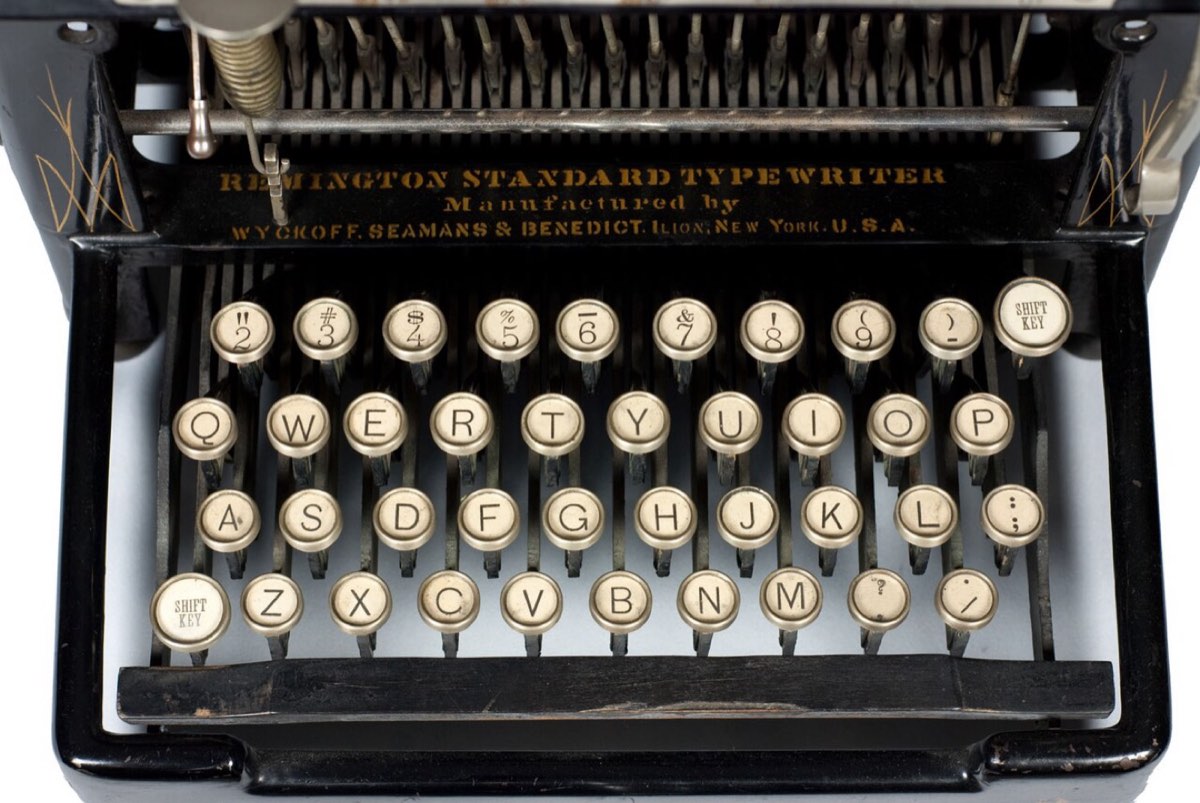
Many typewriters had no 1 key because they did not need one. A lowercase l passes for a 1 on paper, and every key left off the keyboard was one less lever and typebar to build and keep in adjustment. The earliest machines had no 0 either: you typed a capital O. That thrift explains most of what looks strange on a typewriter keyboard, and some of it is still sitting on your desk.
How a typewriter keyboard differs from a computer keyboard
The letters are where you expect them. The differences are around the edges, and most come from one fact: every key on a manual typewriter moved metal.
| Typewriter | Computer keyboard | |
|---|---|---|
| The digit 1 | Often missing. Type a lowercase l | Its own key |
| Exclamation mark | Often missing. Apostrophe, backspace, period | Shift and 1 |
| Locking capitals | Shift lock: every key gives its upper character | Caps Lock: letters only |
| Backspace | Moves the carriage back and erases nothing | Deletes the last character |
| Tab | Sends the carriage to the next stop you set | Inserts a tab or jumps to the next field |
| End of the line | A bell, then a stop. You return the carriage by hand | Text wraps by itself |
| ¢, ½ and ¼ | Common on American machines | Gone |
Details varied by maker, decade and country. What follows is the common American pattern.
Where the QWERTY layout came from
What the record shows
Christopher Latham Sholes, a newspaper editor and printer in Wisconsin, patented a writing machine in 1868 with Carlos Glidden and Samuel Soule. Its first keyboard looked like a piano's, with the letters in alphabetical order. A trace of that order survives in the middle row of your keyboard, which still runs D F G H J K L.
The arrangement then changed repeatedly. By 1870 the keys stood in four rows. In 1873 the arms maker E. Remington and Sons contracted to manufacture the machine, and its mechanics adjusted the keyboard again. The Sholes and Glidden Type-Writer went on sale in 1874. It typed capitals only, and its top row of letters read QWERTYUIOP.
Two details were still different. M sat at the end of the middle row, and C and X were the other way around. They reached their present places on a model of 1882.
What is legend
The familiar story says Sholes scrambled the letters to slow typists down so the typebars would not jam. No evidence supports it. Koichi and Motoko Yasuoka of Kyoto University, who traced the layout through surviving machines, patents and letters in a 2011 paper, call the idea nonsense. The first buyers were telegraph operators writing down Morse code as it arrived. They had to keep up with the sender, so a keyboard meant to slow them would have defeated its purpose.
A milder version says frequent letter pairs were placed far apart inside the machine so their typebars would not collide. The Yasuokas checked this against the typebar basket of the Sholes and Glidden. T and H are on opposite sides, but E and R, the second most common pair in English, are neighbors.
Their own account is that the layout grew by accident: shaped first by telegraphers, then by the manufacturer, and finally by a company changing details to get around older patents. Other histories still give studies of letter pairs a role, so accounts differ. The one part with no support is the plan to make typing slower.
One more legend is half true. Every letter of the word "typewriter" is in the top row, and you can check that yourself. The claim that this was arranged so salesmen could type the name quickly has never been substantiated, and the Yasuokas reject it.
Why many typewriters had no 1 key and no 0 key
The digit row of the Sholes and Glidden ran from 2 to 9. For a 1 you typed a capital I, and for a 0 a capital O. The Yasuokas suggest I was placed near the 8 so that a year such as 1871 could be typed quickly. I and O are still just below the 8 and 9 today.
When lowercase arrived, the small l took over as the 1. Later keyboards added a 0, but many manual typewriters built as late as the mid-twentieth century still had no 1.
The reason was cost. Each key drove its own lever and typebar, so dropping a character that already had a lookalike made a machine simpler to build and to maintain.
The exclamation mark, the cent sign and the fractions key
Many machines had no exclamation mark either. You assembled one from three keystrokes: apostrophe, backspace, period. The two marks print in the same space and read as one character.
American typewriters also had characters that computers later left behind. The cent sign was a regular feature, and on electric typewriters it sat above the 6, where your keyboard now has a caret. Many machines carried a key for ½ and ¼, handy for invoices and measurements. Neither survived the move to the standard computer keyboard.
Why the key is called Shift
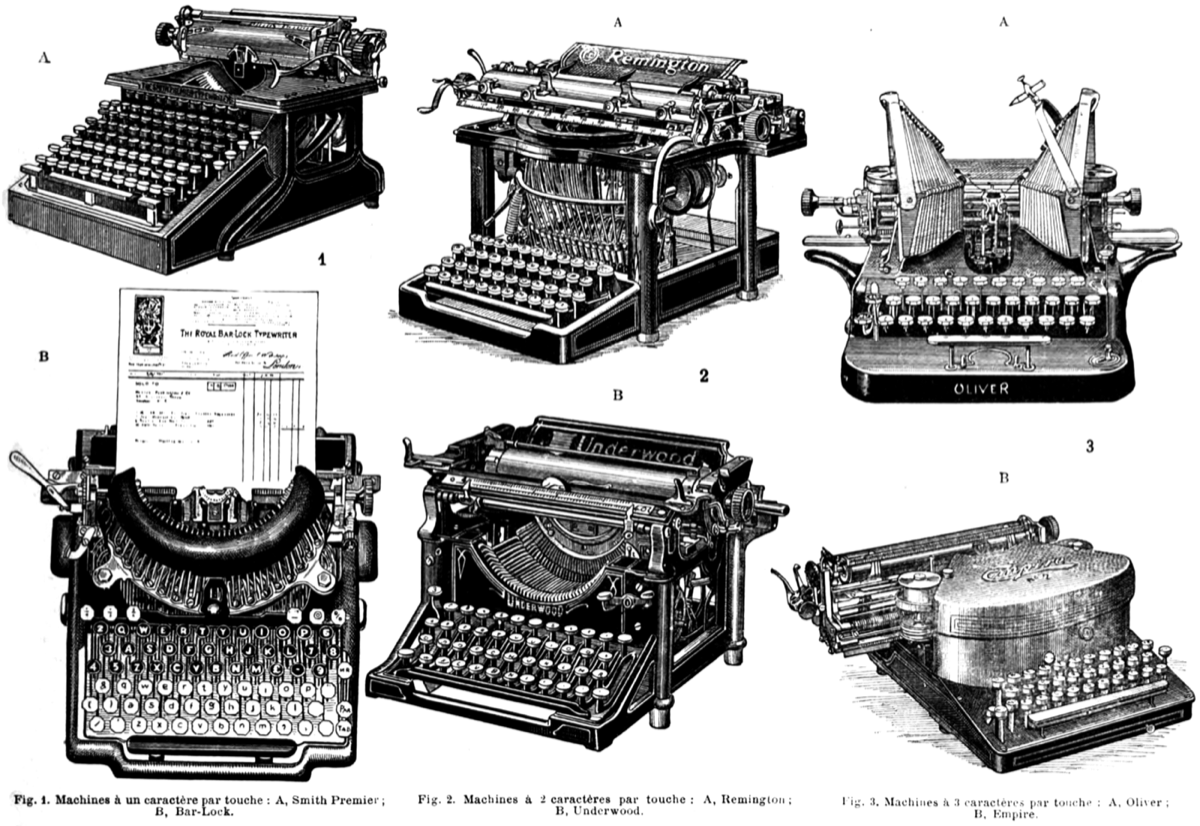
The Sholes and Glidden could print only capitals. Its successor of 1878, the Remington No. 2, put two characters on every typebar, a capital and a small letter, and added a key that moved the platen, the roller that holds the paper, so that the other character met the page. On that machine the key was labeled Upper Case. What it did was shift part of the mechanism, and that is the name that lasted.
Later typewriters shifted in one of two ways. A carriage shift moved the carriage and platen, and a basket shift moved the typebars instead. Either way, one typebar now did the work of two, which roughly halved the number of keys and typebars a machine needed.
Shift lock was not caps lock
For a run of capitals you set the shift lock, which held the mechanism in its shifted position until you pressed Shift again. Everything was shifted, so the digits came out as the symbols above them. Caps Lock on a computer capitalizes letters and leaves digits and punctuation alone.
Backspace erased nothing, which made it useful
On a typewriter, Backspace pushes the carriage back one space. The ink stays on the page, and the next strike lands on top of it. This is overstriking, and typists used it to make characters the keyboard did not have:
- An underlined word: type the word, go back to its first letter, and type underscores along it. The underscore was put on the keyboard for this job.
- An accented letter: type the letter, backspace, then strike the accent over it.
- A cent sign on a machine without one: a lowercase c with a slash through it.
Typewriters built for languages with many accents used dead keys instead. A dead key prints its accent without moving the carriage, so the next letter lands under it.
Tab meant tabulator, and margin release bent the rules
Tab is short for tabulator. The key was added in the late nineteenth century for office work, where figures had to line up in columns. You set stops along the carriage's travel, and each press let the carriage run to the next one.
Margins were stops on the machine too. A bell rang a few characters before the right margin to warn you, and at the stop the carriage went no further. If a word needed two more letters, you pressed the margin release key and typed on past the stop. The same key let you begin a line to the left of the left margin.
Why the rows are staggered
No key on your keyboard sits squarely above another. On a typewriter, each key was the end of its own lever, and the levers ran back into the machine side by side. Offsetting each row kept the levers from running into one another. Computer keyboards have no levers and kept the offset anyway. For what those levers did next, see how a typewriter works.
What computer keyboards kept and what they dropped
QWERTY reached computers through teleprinters, the typewriter-like telegraph terminals that adopted the layout in the 1910s and later served as computer terminals. The rest came across in pieces.
- Kept: the letter layout, the staggered rows, and the names Shift, Tab, Backspace and Return. The symbols above the digits on a US keyboard follow the pattern of electric typewriters.
- Changed: Backspace now deletes. Shift lock became Caps Lock. Return, named for the carriage return, moves a cursor.
- Dropped: the margin release, the margin bell, the fractions key and the cent sign.
The 1 and the exclamation mark, missing for so long, ended up sharing a key.
Try the old tricks on a typewriter in your browser
Typebar is a free typewriter simulator that behaves like the machines described here: the carriage moves, the bell rings before the margin, and in authentic mode the ink stays where it lands. Open the typewriter and try three things.
- Build an exclamation mark. Type an apostrophe, press the left arrow key to step the carriage back one space, then type a period.
- Underline a word. Type it, step back to its first letter with the left arrow, and type underscores along it.
- Type a long line and listen. The bell rings a few characters before the right margin. Press Enter to return the carriage and start the next line.
Backspace also steps back without erasing when the machine is set to authentic mode. The guide explains what the other keys do.
Questions people ask
- Why do old typewriters have no 1 key?
- A lowercase l passes for a 1 on a typed page, so makers left the key out and saved a lever and a typebar. The first commercial machine, the Sholes and Glidden of 1874, had digits from 2 to 9 only and used capital I and O for 1 and 0. Many manual typewriters made in the mid-twentieth century still had no 1 key.
- How do you type an exclamation mark on a typewriter that has no key for it?
- Type an apostrophe, press Backspace, then type a period. Backspace on a typewriter moves the carriage back without erasing anything, so the two marks print in the same space and read as one exclamation mark.
- Was the QWERTY layout designed to slow typists down?
- No evidence supports that story. A 2011 study by Koichi and Motoko Yasuoka of Kyoto University found that the first users were telegraph operators who had to type quickly, and that the layout changed many times between 1868 and 1882. Historians still differ on why some letters moved.
- Why is it called the Shift key?
- On a typewriter the key physically shifted part of the machine. Each typebar carried two characters, and pressing Shift moved the carriage or the basket of typebars so that the upper character struck the paper. The first machine with such a key was the Remington No. 2 of 1878.
- Why are the rows of a keyboard staggered?
- Each key on a mechanical typewriter sat on its own lever, and the levers ran side by side into the machine. Offsetting the rows kept the levers from running into each other. Computer keyboards kept the offset even though they have no levers.