How to use a typewriter font in Google Docs and Word
Courier New is already in Word and Google Docs. How to add Courier Prime or Special Elite, install a font for Word, and set up a page that looks typed.
Courier New is the typewriter font you already have. It comes with Windows and macOS, so it is in Word's font list on either system, and it is in the Google Docs font menu too. For a closer match to an old machine, add a free font such as Courier Prime, Special Elite or Cutive Mono. Google Docs adds them from its More fonts window. Word needs the font installed on your computer first. The steps for both follow, then the settings that make a page read as typed.
Typewriter fonts Word and Google Docs already have
| Font | Word on Windows | Word on Mac | Google Docs |
|---|---|---|---|
| Courier New | Yes | Yes | Yes |
| American Typewriter | No | Yes | No |
| Courier Prime, Special Elite, Cutive Mono | After you install them | After you install them | Through More fonts |
Courier New ships with Windows and is on Microsoft's list of Windows 11 fonts. Apple includes it with macOS as well, so a document set in it looks the same on both.
American Typewriter is in Apple's list of fonts included with macOS, which is why Word on a Mac shows it and Word on Windows does not. It has typewriter letter shapes with proportional spacing, so an i is narrower than an m. That suits a heading better than a page meant to look typed.
Other fonts vary. Windows also has monospaced faces such as Consolas and Lucida Console, but they were drawn for screens and code, not to imitate a typewriter. What else you see depends on your system and on any fonts you have installed. For a fuller comparison of the faces, see what font looks like a typewriter.
How to choose a typewriter font in Word
- Select the text you want to change, or press Ctrl+A (Cmd+A on a Mac) to select the whole document.
- On the Home tab, click in the font box, which shows the current font's name.
- Type Courier New, or American Typewriter on a Mac, and press Enter.
- In the size box beside it, choose 12.
To use the font in every new document, set it as the default. On Windows, go to Home, open the Font dialog with the small launcher at the corner of the Font group (or press Ctrl+D), choose the font and size, select Set As Default, then choose All documents based on the Normal template and click OK. In Word for Mac, go to Format > Font, choose the font and size, and select Default.
How to add a typewriter font in Google Docs
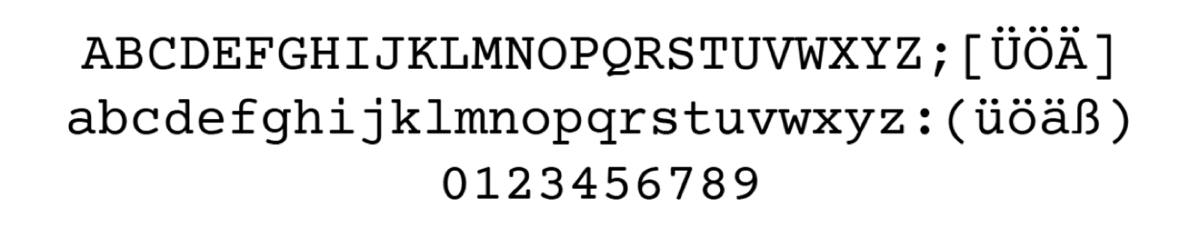
Google Docs shows a short font list, but it can draw on the whole Google Fonts library, and several typewriter faces are in it.
- Open your document and click the font name in the toolbar. A new document shows Arial.
- Choose More fonts.
- In the search box, type Courier Prime.
- Click the font. It moves to the My fonts list on the right.
- Search for Special Elite and Cutive Mono and click those too, if you want to compare them.
- Click OK. The fonts now appear in the font menu.
- Select your text and choose one of them from the menu.
From the keyboard, press Alt+/ (Option+/ on a Mac), type more fonts and press Enter to open the same window.
The three fonts suit different jobs:
- Courier Prime is a cleaner, slightly heavier Courier with a real bold and italic. Use it for anything long.
- Special Elite imitates worn, inky typewriter type. It has one style, and its letters are not strictly the same width, so do not use it to line up columns.
- Cutive Mono is a true monospace modeled on classic office typewriters, in one weight.
To make the font the default, select some text in it, then go to Format > Paragraph styles > Normal text > Update 'Normal text' to match. Then go to Format > Paragraph styles > Options > Save as my default styles so new documents start with it.
Google Docs cannot use fonts installed on your computer
Google Docs runs in the browser and uses only its own fonts. Installing Courier Prime on your computer changes nothing in Docs, and there is no way to upload a font file. If a font is not in More fonts, Docs cannot use it. The fonts above are all there, so for a typewriter look you never need to leave the menu.
How to install a typewriter font so Word can use it
Word uses the fonts installed on your computer. Courier Prime, Special Elite and Cutive Mono are free to download from their Google Fonts pages. Download fonts only from a source you trust.
On Windows
- Download the font. It usually arrives as a .zip file.
- Right-click the .zip file and choose Extract All.
- Open the extracted folder, right-click the .ttf or .otf file, and choose Install.
- Close Word and open it again. The font is now in the font list.
On a Mac
- Download the font and double-click the .zip file to unpack it.
- Double-click the .ttf or .otf file.
- Click Install in the window that opens. Font Book adds the font.
- Quit Word and open it again, then choose the font from the list.
These steps follow Microsoft's instructions for installing fonts for Office and Apple's Font Book guide.
A font you install works only on your computer. If you send the Word file to someone who does not have it, Word shows a substitute. Send a PDF instead, or in Word for Windows turn on File > Options > Save > Embed fonts in the file. Not every font allows embedding.
Settings that make it look typed
The font is half the effect. The rest is the page.
- Use 12 point. Courier New at 12 points fits ten characters to the inch, the spacing of a pica typewriter. Courier Prime matches Courier's widths, so it lands on the same grid. The arithmetic is in pica vs elite.
- Single space a letter and double space a manuscript. In Word, go to Home > Line and Paragraph Spacing and choose 2.0. In Google Docs, go to Format > Line & paragraph spacing and choose Double. Standard manuscript format asks for double spacing.
- Align left. A typewriter could not stretch the spaces in a line, so typed pages have a ragged right edge. Justified text gives the game away. In Word press Ctrl+L. In Google Docs go to Format > Align & indent > Left.
- Underline instead of italics. Most typewriters had no italic type, so typists underlined titles and emphasis, and a typesetter read the underline as italics. If you are submitting a manuscript, follow the publisher's guidelines on this point.
- Use straight quotes. Typewriters had one straight mark for both opening and closing quotes, while both programs curl quotes as you type. In Word for Windows, go to File > Options > Proofing > AutoCorrect Options > AutoFormat As You Type and clear the smart quotes option. In Google Docs, the autocorrect settings are under Tools > Preferences.
- Two spaces after a period, if you like. Typing classes taught it, and in a monospaced font it looks natural. It is a matter of taste, not a rule.
- Keep one inch margins. That is the default in both programs, and it is what a typist would have set.
What no font can do
Every font has the same limit. It holds one drawing of each character, so both e's in "letter" are identical: same shape, same height, same flat black. Even a distressed font such as Special Elite repeats the same nick on every copy of a letter.
A typed page varies. Each letter is a separate strike, so a key hit harder prints darker, a tired ribbon prints gray, and a typebar slightly out of true sets its letter a little high or tilted.
If you want that variation, type the text on Typebar's typewriter instead of styling it. Each strike lands with its own ink density and a slight misalignment, and the finished page can be saved as a PDF or a PNG image, or printed. For a heading or a single line, the typewriter font generator is quicker than installing anything.
Questions people ask
- What typewriter font is already in Microsoft Word?
- Courier New, which comes with both Windows and macOS, so Word lists it on either system. On a Mac, Word also lists American Typewriter, which Apple includes with macOS. It has typewriter letter shapes but is not monospaced.
- How do I get a typewriter font in Google Docs?
- Click the font name in the toolbar, choose More fonts, and search for Courier Prime, Special Elite or Cutive Mono. Click a font to add it to My fonts, click OK, and it appears in the font menu.
- Can Google Docs use a font installed on my computer?
- No. Google Docs offers only its own font list and the Google Fonts library under More fonts. A font you install on Windows or macOS shows up in Word and other desktop programs, not in Docs.
- What size should a typewriter font be?
- Use 12 point. Courier New at 12 points fits ten characters to the inch, the spacing of pica type on a typewriter, and Courier Prime matches Courier's character widths.
- Why does a typewriter font still not look typed?
- A font draws every copy of a letter the same way, filled with the same flat ink. On a typewriter each letter is a separate strike, so pressure, ribbon and alignment vary a little from one character to the next.